You may have years of awards, articles, project records, and letters. But having these records is only half the job. You also need to know how to organise EB-1A evidence. You need to know where they are, what they show, and what is still missing as scattered files, duplicate copies, and mismatched dates can slow petition preparation.
To organise EB-1A evidence, start by listing the documents you have. Then track each file, group related records, and build a timeline of your achievements. Finally, check for missing files and details that do not match.
This guide offers a step-by-step process for organising your EB-1A supporting documents and preparing them for review.
Why Is It Important to Organise EB-1A Evidence?
Organising EB-1A evidence means keeping your records in a clear system. You should know what each file contains, where it came from, and which achievement it relates to.
A good system helps you:
- Find any document without wasting time.
- See which achievements have records to support them.
- Spot missing or incomplete files early.
- Find details that do not match across records.
- Make it easier for another person to review your documents.
Disorganised files can cause delays. You may overlook an important record or find an error too late to fix. A clear system helps you stay in control of your documents. However, it does not decide whether you qualify for an EB-1A visa.
Not sure whether your achievements may qualify you for an EB-1A visa? Take the free VeriPass assessment to get a clearer idea of where you stand and what to consider next.
How to Organise EB-1A Evidence: A Step-by-Step Guide
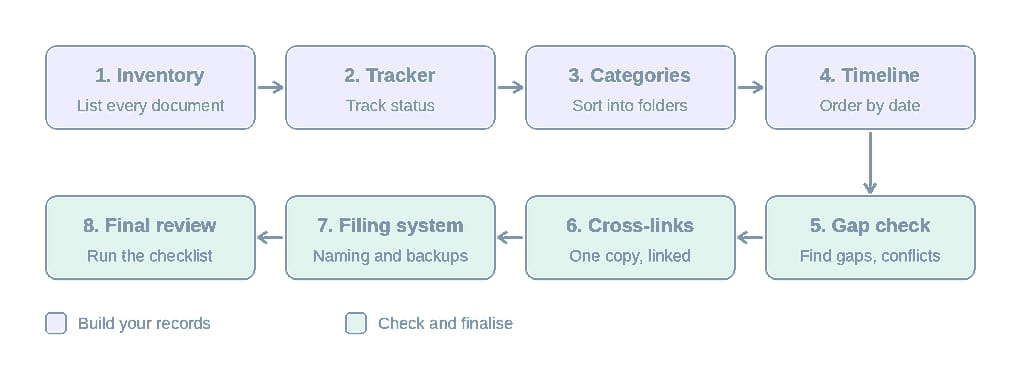
Follow these eight steps to build a clear system for your EB-1A documents. You can use a spreadsheet and a cloud storage folder to get started.
Step 1: Create an Inventory of Your EB-1A Supporting Documents
An evidence inventory is a list of all the documents you have for your EB-1A case. Create one before you start sorting your files.
First, search the places where your records may be stored:
- Email accounts
- Cloud storage
- Old laptops and hard drives
- Employers and HR teams
- Professional groups
- Publishers and event organisers
For each document, record its name, source, date, related achievement, and current status.
Here is a simple example:
| Document | Source | Related achievement | Status |
| Award certificate | Awarding body | Industry award | Available |
| Published article | Publisher | Media coverage | Needs full copy |
| Employment letter | Employer | Professional role | Available |
| Conference invitation | Event organiser | Speaking activity | Needs confirmation |
If you find an article or record online, save a complete copy where possible. Keep its web address, publication name, and date. This will help you find and check the source later.
Your inventory is a starting point. You do not need to maintain a separate inventory and tracker. You can expand this list into a full evidence tracker as you sort your files.
Step 2: Build an EB-1A Evidence Tracker
An EB-1A evidence tracker is a spreadsheet that helps you monitor each document. It shows what you have, where it is stored, and what you still need to do.
You can use Excel, Google Sheets, or another tool.
Start with these columns:
| Field | What it tells you |
| Document ID | A unique number for each file |
| Document name | The name of the record |
| Related achievement | The work or event it supports |
| Intended criterion | The category you plan to link it to |
| Source | Where the record came from |
| Date | When it was made or issued |
| Status | Available, missing, incomplete, or needs review |
| File location | Where you saved it |
| Next action | What you still need to do |
Here is a filled-in example:
| ID | Document | Achievement | Status | Next action |
| 001 | Award certificate | Industry award, 2022 | Available | None |
| 002 | Award selection letter | Industry award, 2022 | Missing | Contact awarding body |
| 003 | Published profile | Project recognition | Incomplete | Get full article |
| 004 | Employment letter | Senior role, 2021–2024 | Needs review | Confirm job title |
Keep your status labels short and use the same ones each time. But note that the tracker is an internal tool. USCIS does not require you to use one, but the label helps you manage your records.
The intended criterion column is also for your own planning. You can read our guide to EB-1A eligibility criteria to learn what each category means.
Step 3: Group Your Evidence Into Clear Categories
To organise your EB-1A documents, sort them into folders based on the type of record or the achievement they support.
Useful folder names include:
- Awards and recognition
- Publications and media coverage
- Research and scholarly work
- Professional memberships
- Judging and reviewing activities
- Leadership and critical roles
- Original contributions
- Salary and pay records
- Other supporting documents
You can create more folders when you need them. For example, if you have worked at several companies, create a folder for each employer. If you have many records, add folders for each year.
Use the same pattern across your files. This makes them easier to find and review.
These are suggested folders for your own use. They are not a required USCIS filing format.
Step 4: Create a Timeline of Your Achievements and Supporting Records
An evidence timeline is a list of your achievements in date order, with the records that support each one.
It helps you see how your work has developed over time. It can also show where you have few records or need to check a date.
For each entry, record:
- When the achievement happened
- What you achieved
- Which documents support it
- When each document was made or issued
Keep the achievement date separate from the document date. For example, you may have received an award in June 2022 but received the certificate in July 2022.
Here is a sample:
| Achievement date | Achievement | Supporting record | Document date |
| June 2022 | Received an industry award | Award certificate | July 2022 |
| March 2023 | Published research | Journal article | March 2023 |
| May 2024 | Invited to judge a contest | Invitation email | May 2024 |
The timeline is a planning tool. It does not prove that you meet an EB-1A criterion or that you have sustained acclaim.
For more ideas on the types of achievements you may need to document, see these examples of extraordinary ability.
Step 5: Identify Missing, Incomplete, and Inconsistent Documents
To find problems, compare your inventory and tracker with your CV and stored files.
Look for three types of issues.
Missing documents
These are records you refer to but cannot find.
Examples include:
- An award listed on your CV with no supporting file
- No official confirmation of an award
- No copy of a published article
- A missing letter from an employer or event organiser
Incomplete documents
These files don’t show all the details you need to identify them.
Examples include:
- Screenshots without the full article or publication details
- Files with missing pages
- Records with no date or source name
- A letter that does not show who issued it
Inconsistent documents
These are records that show details that do not match.
Examples include:
- Names spelt in different ways
- Job titles or work dates that conflict
- Different figures for the same achievement
- Dates that do not match across records
For example, your employment letter may say you were a “Senior Analyst” from March 2020. But your online biography may say you became a “Lead Analyst” in January 2020.
Add both records to your tracker. In the notes, write: “Job title and start date differ.” Then check your HR records or ask your employer to confirm the correct details.
If you cannot find an original record, note that in your tracker. Check whether another reliable source can confirm the same event. This could be an official award announcement or a letter from the organisation.
Never create evidence that does not exist or change an original document to make the details match.
Step 6: Handle Documents That Support More Than One Achievement
One document may relate to more than one achievement or EB-1A criterion. When this happens, keep one main copy and record each link in your tracker.
Follow these steps:
- Save one main copy of the document.
- List every related achievement in your tracker.
- Add a note for each link.
- Use cross-references when needed.
- Avoid saving extra copies in different folders.
For example, a published profile may describe your work on a project. It may also show that a media outlet featured you.
Keep the profile in one folder. Then link it to both entries in your tracker. This helps you avoid duplicate files and keeps the source clear. However, linking a document to more than one claim does not mean it will meet more than one criterion. That depends on what the document shows.
Step 7: Create a Consistent Digital Filing System
A good filing system helps you find any record without opening every file. Use clear names, keep original copies, and back up your files.
A simple file name should include the year, source, and document type.
For example:
2024_AwardName_Certificate.pdf
2023_PublicationName_Article.pdf
2022_EmployerName_EmploymentLetter.pdf
Avoid names like:
Document1.pdf
Screenshot_final2.jpg
NewFile.pdf
These names do not tell you what the files contain.
Also, follow these habits:
- Keep untouched originals in a separate folder.
- Store drafts away from final copies.
- Record the latest version in your tracker.
- Open each file to check that it works.
- Keep at least one secure backup.
Your records may contain private details. Use password-protected storage and avoid public sharing links.
Step 8: Conduct a Final EB-1A Evidence Review
A final evidence review is a last check of your files before petition preparation begins.
Use this checklist:
- [ ] Every document has a clear name.
- [ ] Each document has a known source.
- [ ] Relevant dates are recorded.
- [ ] Missing documents are flagged.
- [ ] Inconsistent details have been checked.
- [ ] Duplicate files are identified.
- [ ] Original documents are preserved.
- [ ] Files open and display correctly.
- [ ] The tracker matches the stored files.
- [ ] You can find any record quickly.
This is a check of your document collection. It is not a legal review of your eligibility or your readiness to file.
For official information, read 8 CFR 204.5 and the USCIS Form I-140 page. You can also read our guide to EB-1A visa requirements.
How Do You Prepare Organised EB-1A Evidence for Petition Review?
Once your documents are in order, the next task is to make them easy to review. A person reading your records should be able to understand what each group of documents relates to and where the information came from.
Here are four ways to prepare your files for review.
1. Connect each achievement to its supporting records:
Do not leave files without context. For each major achievement, list the records that relate to it. For example, an award may have a certificate, an official announcement, and a letter from the awarding body.
2. Keep related records together:
Group documents that help explain the same event or achievement. This may include the main record and other files that give more detail about it. Keep the source and date clear.
3. Check that the records tell the same story:
Compare names, dates, job titles, and figures across your files. If two records show different details, find out why before the documents are used in the petition.
4. Make it easy to find the source:
Keep full copies of important records where possible. For online articles, save the web address, publication name, and date. For letters, keep the name and role of the person or group that issued them.
These steps help make your document collection easier to review. They do not replace the legal work needed to prepare a petition. You must still assess the evidence against the EB-1A rules.
Frequently Asked Questions
How should I organise my EB-1A evidence?
Start by listing every document you have. Add each file to a tracker with its source, date, related achievement, and status. Then group your files into folders, build a timeline, and check for missing or conflicting records.
Should I organise EB-1A evidence by criterion or by achievement?
You can use both methods for your own records. Grouping by achievement keeps related documents together. Grouping by criterion helps you track how each file may fit your case. Your tracker can connect one document to both.
Can one document support more than one EB-1A criterion?
Yes, one document may relate to more than one claim. Its value depends on what it shows in each case. Keep one main copy and record every link in your tracker.
Should EB-1A supporting documents be arranged by date?
Keep a timeline of your achievements in date order. Your main folders can still be grouped by document type or achievement. This gives you two ways to find and review your records.
What should an EB-1A evidence tracker include?
At a minimum, include the document ID, name, related achievement, intended criterion, source, date, status, file location, and next action. You can add more fields if they help you manage your records.
Make Your EB-1A Evidence Easier to Manage
Good organisation is not about having the most files. It is about knowing what you have, where each record came from, and what still needs attention.
With an inventory, tracker, timeline, and clear folder system, you can find your records and spot problems early. You can also make your collection easier for another person to review.
Once your records are in order, the next step is to prepare them for your petition. Learn more about preparing an EB-1A petition with VeriPass.